

Attachment settings
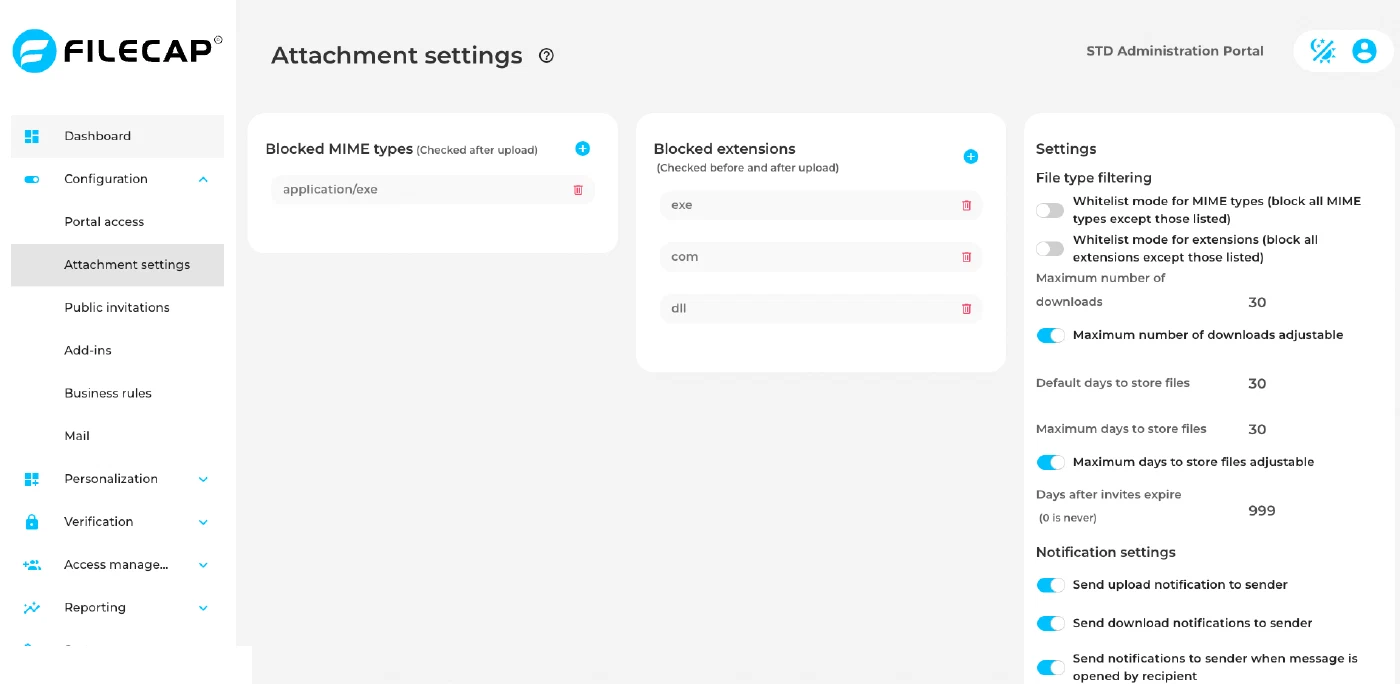
On this page you decide which files users may send, how long files stay available, how often they may be downloaded, and which notifications the sender receives.
File type lists#
The page shows two lists: one for MIME types and one for file extensions. Click + above a list to add an entry. Each list holds one entry per field. To remove an entry, use the remove button next to it.
| List | Description |
|---|---|
| Blocked MIME types (Checked after upload) | Files with one of these MIME types are blocked. Enter one MIME type per entry, for example application/x-msdownload. Wildcards such as application/* are not supported. |
| Blocked extensions (Checked before and after upload) | Files with one of these extensions are blocked. Enter the extension without the dot, for example exe. Only the last extension of a file name counts: report.pdf.exe is checked as exe. Letter case does not matter. |
By default, FileCap blocks the MIME type application/x-msdownload and the extensions exe and com.
Whitelist mode#
By default, both lists are block lists: everything is allowed except what you list. With whitelist mode, this works the other way around: everything is blocked except what you list.
| Setting | Description |
|---|---|
| Whitelist mode for MIME types (block all MIME types except those listed) | When enabled, the MIME type list changes to Allowed MIME types. Only files with a MIME type in that list can be sent. Default: disabled. |
| Whitelist mode for extensions (block all extensions except those listed) | When enabled, the extensions list changes to Allowed extensions. Only files with an extension in that list can be sent. Default: disabled. |
The allowed lists are separate from the blocked lists. When you turn on whitelist mode, the blocked list is kept but no longer used. The first time, the allowed list is empty. When you turn whitelist mode off again, the blocked list applies again and the allowed list is kept for later.
Warning: if whitelist mode is enabled and the allowed list is empty, every upload is blocked. The page shows a warning under the switch until you add at least one entry. Add the allowed entries first, or immediately after enabling whitelist mode.
The MIME type and extension settings work independently. A file is only accepted if it passes both checks.
Examples#
| Goal | How to configure |
|---|---|
| Block executable files | Leave whitelist mode off. Add exe, com, bat and msi to Blocked extensions, and keep application/x-msdownload in Blocked MIME types. |
| Allow only PDF and Office files | Enable Whitelist mode for extensions and add pdf, doc, docx, xls, xlsx, ppt and pptx to Allowed extensions. Leave whitelist mode for MIME types off. |
| Allow only PDF files, also checked on content | Enable both whitelist modes. Add pdf to Allowed extensions and application/pdf to Allowed MIME types. |
Downloads and storage#
For both the number of downloads and the storage period you set a default, a maximum, and whether the sender may change the value.
| Setting | Description |
|---|---|
| Default number of downloads | The number of times files may be downloaded per recipient, as filled in for a new transfer. Allowed range: 1 up to the maximum number of downloads. Default: 30. |
| Maximum number of downloads | The highest number of downloads per recipient a sender can choose. Allowed range: 1 to 999. Default: 30. |
| Maximum number of downloads adjustable | When enabled, senders can change the number of downloads in the portal and the Outlook add-in, between 1 and the maximum. When disabled, every transfer uses the default number of downloads. Default: enabled. |
| Default days to store files | The number of days files are kept, as filled in for a new transfer. Allowed range: 1 up to the maximum days to store files. Default: 30. |
| Maximum days to store files | The highest number of days a sender can choose before the files are deleted from the FileCap server. Allowed range: 1 to 1095 (3 years). Default: 30. |
| Maximum days to store files adjustable | When enabled, senders can change the number of days in the portal and the Outlook add-in, between 1 and the maximum. When disabled, every transfer uses the default number of days. Default: enabled. |
| Days after invites expire (0 is never) | The number of days an invite link remains valid. Set this value to 0 to make invite links never expire. Default: 30. |
The default can never be higher than the maximum. If you lower the maximum below the current default, FileCap uses the maximum as the default.
Notification settings#
| Setting | Description |
|---|---|
| Send upload notification to sender | If this option is enabled, the sender will receive a notification that the upload has been successfully sent to the specified recipients. This notification also contains a link to revoke the transfer. Default: enabled. |
| Send download notifications to sender | If this option is enabled, the sender will receive a notification when the sent files have been downloaded. Default: disabled. |
| Send notifications to sender when message is opened by recipient | If this option is enabled, the sender will receive a notification when the message has been opened by the recipient. Default: enabled. |