

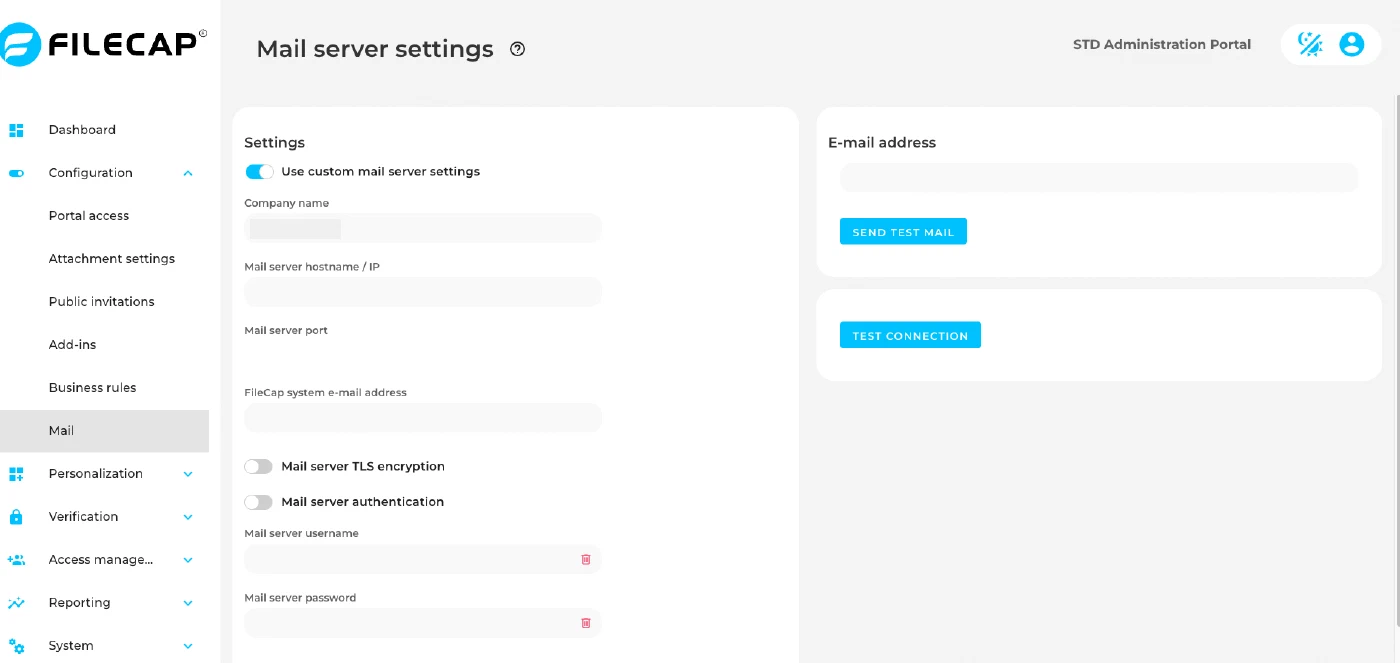
By default FileCap sends all mail through its own mail service. This is the recommended setup and needs no configuration. Using your own mail server is optional.
Switches save as soon as you change them, and “Mail server port” saves shortly after you type. The other text fields save only when you click the check mark next to the field or press Enter; click the cancel icon to discard your change.
Switching on “Use custom mail server settings” takes effect immediately. From that moment FileCap sends all mail through your own mail server, so mail stops until every field is filled in correctly. Follow the steps under Set up your own mail server.
| Setting | Description |
|---|---|
| Use custom mail server settings | If this option is disabled, FileCap’s own mail service is used to send emails. If this option is enabled, a custom mail server can be defined. Do not turn this on and leave the fields below blank, this will prevent any FileCap mails from being sent. |
| The options below are visible when “Use custom mail server settings” is enabled: | |
| Company name | Enter the company name here; it is used as the sender name of the email. |
| Mail server hostname / IP | Enter the hostname or IP of the mail server that will be used for sending emails. |
| Mail server port | Enter the mail server port here, usually 587 or 25. |
| FileCap system e-mail address | Enter the email address that is used as the sender of the email. |
| Mail server TLS encryption | Enable this option to encrypt the connection with STARTTLS. Implicit TLS (usually port 465) is not supported; use port 587 or 25 instead. |
| Mail server authentication | Enable this option if authentication is required for the connection to the mail server. |
| Mail server username | Enter the username to be used. |
| Mail server password | Enter the password for the username specified above. |
| Always use FileCap system e-mail address for notifications | If this option is enabled, notifications will always be sent on behalf of the email address specified under “FileCap system e-mail address”. If the option is disabled, notifications will be sent on behalf of the user who sent the transfer or invite. Your mail server must then be allowed to send as those addresses, and your SPF and DMARC records must permit it. |
| E-mail address / Send test mail | Enter an email address and click “Send test mail” to send a test message with the current settings. |
| Test connection | Checks whether FileCap can connect to the mail server with the current settings. Visible when “Use custom mail server settings” is enabled. |
Set up your own mail server#
- Collect the details of your mail server first: hostname or IP, port, whether it uses STARTTLS, and the username and password if authentication is required. Make sure the mail server accepts mail from FileCap.
- Switch on “Use custom mail server settings”. Mail is now sent through your mail server, so complete the next steps without delay.
- Fill in “Company name”, “Mail server hostname / IP” and “FileCap system e-mail address”. Click the check mark or press Enter after each field to save it.
- Decide on “Always use FileCap system e-mail address for notifications”. This switch is off by default, so notifications are sent from the address of the user who sent the transfer or invite, including senders outside your organization. Many mail servers reject mail sent as addresses outside your own domain, or the mail fails SPF and DMARC checks. Enable this switch unless your mail server is allowed to send as every sender address, including external ones.
- Enter the “Mail server port”.
- Set “Mail server TLS encryption” and “Mail server authentication”. If you enabled authentication, fill in “Mail server username” and “Mail server password” and save each.
- Click “Test connection” and check that it succeeds.
- Enter your own email address under “E-mail address”, click “Send test mail” and check that the message arrives.
If the test fails and you cannot fix it right away, switch off “Use custom mail server settings”. FileCap then sends mail through its own mail service again.
Sending through Microsoft 365#
Microsoft is phasing out SMTP authentication. To send FileCap mail through Microsoft 365, we recommend a connector that accepts mail based on the IP address of FileCap, without a username or password.
- Create a connector in Microsoft 365 as described in Microsoft’s documentation (option 3, SMTP relay).
- Allow the IP address of the platform your FileCap environment runs on:
| Platform | IP address |
|---|---|
| Scaleway | 51.15.72.203 |
| AWS | 3.126.162.206 |
If you do not know which platform your environment runs on, email support@filecap.com.
- Configure the mail server settings in FileCap:
| Setting | Value |
|---|---|
| Mail server hostname / IP | Your Microsoft 365 MX endpoint, for example yourcompany-com.mail.protection.outlook.com |
| Mail server port | 25 |
| Mail server TLS encryption | Enabled |
| Mail server authentication | Disabled |
| FileCap system e-mail address | An address on your own domain |
| Always use FileCap system e-mail address for notifications | Enabled |