

Portal access
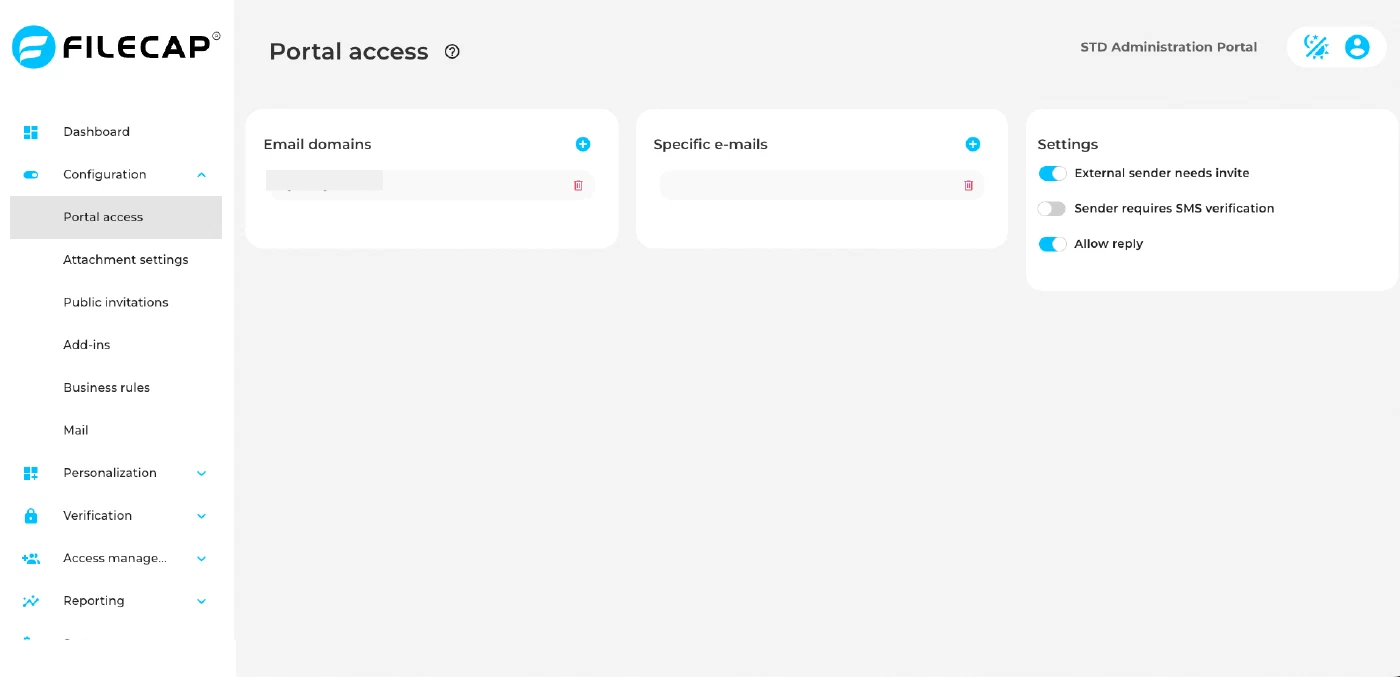
On the Portal access page you tell FileCap which email addresses belong to your organisation. FileCap uses this list to decide who may send files to whom through the portal. The same list is also used by the Outlook add-in and to count the users for your license, so set it up before you start using FileCap.
How FileCap decides who may send to whom#
An email address is internal when its domain is listed under “Email domains”, or when the full address is listed under “Specific e-mails”. All other addresses are external.
A transfer through the portal is allowed when at least one of these is true:
- The sender is internal.
- All recipients are internal.
- The transfer is sent from a network that was marked as local when the portal was installed.
In practice this means that colleagues can send files to anyone, and that people outside your organisation can only send files to your colleagues. An external sender who adds an external recipient gets an error and the transfer is not sent.
With “External sender needs invite” enabled, external people cannot sign up on the portal by themselves. They can still send files to your organisation through an invite sent from one of the FileCap add-ins, or through a Public invitation link.
Set up portal access#
- Log in to the admin portal and go to “Configuration” > “Portal access”.
- Check the list under “Email domains”. A portal created through the trial sign-up already contains the domains entered at sign-up. A portal created by a reseller starts with the example domains
domain1.comanddomain2.com. If these placeholders are present, remove both and add your own domains. Until you do, nobody from your organisation counts as internal. - Under “Email domains”, click “+” to open the “Add Domain” dialog. Enter one domain, for example
company.com, and click “Add”. Repeat this for every domain your organisation uses for email, for examplecompany.comandcompany.nl. - Under “Specific e-mails”, click “+” to open the “Add Email” dialog and add any single address that should count as internal but is not covered by a domain, for example a colleague who uses a gmail.com address.
- To change an entry, edit it in the list and confirm with the check mark. To remove an entry, click the trash can icon next to it.
- Under “Settings”, turn on the options you need. See the table below.
Settings#
| Setting | Description |
|---|---|
| Email domains | The email domains of your organisation, one per entry, for example company.com. Every address in these domains is internal. Generic domains such as gmail.com, outlook.com or hotmail.com cannot be added here, use “Specific e-mails” instead. Entering * makes every domain internal, see the notes below. |
| Specific e-mails | Individual email addresses that are internal, one per entry. Use this for colleagues who do not have an address in one of your own domains, for example when they use a public service such as gmail.com. Adding person@gmail.com makes only that address internal, not unknownperson@gmail.com. A specific address is internal for both sending and receiving. |
| External sender needs invite | When enabled, the portal is closed to external senders. They cannot sign up on the portal themselves and can only send files after receiving an invite from a FileCap add-in, or by using a Public invitation link. Internal senders can still sign up as usual. |
| Sender requires SMS verification | When enabled, senders on the portal can only send files after entering the code they received by SMS. Invited senders are not asked for this code. This switch is read-only until SMS verification is enabled, see SMS verification. On SaaS portals SMS is provided by FileCap and cannot be set up by the portal administrator. If the switch stays read-only, contact support@filecap.com. |
| Allow reply | When enabled, recipients can reply to a transfer from the download page and send files back to the sender. |
Notes#
- One list, three uses. The “Email domains” list is sent to the Outlook add-in as its list of internal domains. FileCap also uses “Email domains” and “Specific e-mails” to count your users for the license: every unique sender of the last month whose address is internal counts as one user.
- Using
*. With*under “Email domains”, every email address is internal. Anyone can then send files to anyone through your portal, and “External sender needs invite” no longer keeps anyone out. Only use*if that is what you want. - Changes apply right away. Every change is saved as soon as you add, edit or remove an entry or switch a setting. If a domain is removed, people in that domain become external from then on.
- Invalid entries. You cannot remove an entry while another entry in the same list is invalid. Fix or remove the invalid entry first.